Saturday, May 19, 2012

Final Blog #8/Final Digital Story

I present you my Culminating Proposal! I'm ecstatic that my proposal was also approved so that I can now begin the process. :)


I'm happy to say that the process of creating digital stories have gotten easier each week! The process of creating a digital story (using story core, story mapping, and story boarding) to organize the necessary photos, video clips, & audio has made me very comfortable using Windows Live Movie Maker. As I mentioned in my last post, I feel super confident to attempt this process with my students now that I am familiar with the program.

My main challenge was the audio portion. For segments that I used actual video footage, I would record commentary while filming. I would prefer to add audio this way because the sound would already be embedded within the movie. However, this method makes it difficult to edit the footage because each clip would have to be perfect. While putting the digital story together, I realized that some of my prerecorded clips would not match the previous clip, thus I had to use record new audio anyways. Using youtube videos, I learned how to create and save basic sound clips for my digital story using Audacity. I had a lot of trouble with the noise level of recordings, and I spent quite a deal of time recording my audio with and without a microphone. I even had to resort going into my room to record a better sounding clip. Next time, I would like to try a different program (or even a different computer) to record sound.

Overall, I've learned so many new things to incorporate into my teaching practices through the course of this class. To be honest while watching youtube or short videos, I now pay so much more attention to the effects and/or sound/images used in the video so that I can I improve my video editing skills. I plan on creating short videos about certain classroom procedures that I use in my class so that I don't have to "teach" it over and over. My students (and other teachers/parents) can watch the videos to learn the basics in my class. This would be super helpful for new students who enter my class throughout the school year! Ultimately, I'm excited for the other possibilities that DST can do for my current teaching! :)

Sunday, May 13, 2012

Blog #7/Video #4

My culminating proposal will focus on how technology lessons will affect my incoming sixth grade class and if the lessons will improve their basic computer skills. My final video will portray a realistic experience that some of my students may encounter since I work in a low-socioeconomic area where not all families have home computers with internet access. Thus, some students' computer skills are not up to par to those with computer access. Although my lessons are not fully designed, I will also introduce the different computer topics that will be taught to next year's class.

Story Core: To explain the problem, I will create a realistic story of two friends who are assigned to work on a school project. They encounter some computer issues because one friend (Student A) has computer access at home, while the other one (Student B) does not. Student A becomes upset because Student B can't help out with the research component at home, while Student B feels embarrassed about not being able to put forth the same amount of effort. The two friends finally ask the teacher for help! Will it be enough?

Story Map:


Storyboard: My video displays a rough sketch of what I would incorporate for my final video. I will be taking actual pictures and using video recordings (of my students) to explain my story core as well as screen shots of my possible technology lesson integration. 

Edit* Now with sound and some revisions! 


Sunday, May 6, 2012

Video #3: How to Make Spring Rolls

My love for delicious food (and my obsession for the Food Network) inspired this week's video assignment.


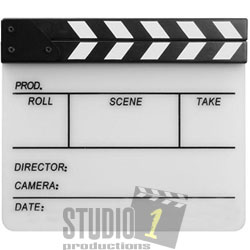
Image: Movie Slate
When I first saw the directions for this week's video, I instantly knew I was going to shoot a video about food. I decided to make Vietnamese Spring rolls because they are delicious and light for spring, but they are extremely complicated (more labor-intensive) to make. Also, it would give me more footage to shoot.

The use of a storyboard was the most useful tool for me this week because videos have more footage that need to be planned. By starting with the "idea" that I designed within the storyboard, things ended up changing when I started video recording. However, it helped to know what "shots" I needed to get to capture the overall concept.

Although I don't plan on being a movie director in the future, other tools that I wished I had include: a movie slate (see left) so that I could keep track of my shots, a tripod to make the video steady, different lighting options (besides my kitchen light), and possibly a better camera lens to capture clearer shots of the star of my movie! I recorded my movie alone, and another helping hand would have been more beneficial. If I was to incorporate DST, I would definitely allow collaborative groups so that students can help each other out. However, I do have to thank Marci for lending a helping hand when she sent me a song through dropbox when I was having issues with iTunes! Lastly, I have to thank youtube for the plethora of "Windows Movie Live" videos to troubleshoot any questions I had while creating my movie this week. Overall, I am proud of my first video with video recordings and music! If I had more time, I would try to make my movie flow smoother with better transitions and experiment with more music.

Saturday, April 28, 2012

Ch. 13: The Digital Storytelling Toolbox

Ohler's advice regarding "start with what you have" (pg. 166) really struck a cord with me this week. I had felt a bit defeated in past weeks because my school district lacked funding for technology tools that DST would require. However, after creating the two videos for this class, I felt more inspired (and comfortable) to have my students use the free software (Windows Movie Maker) for creating stories of their own. Having spent some time with my students at Science camp taking digital photos of the awesome sights, I suggested them to try out Movie Maker at home to create a slide show with their photos. It would be great practice for students to become familiar with the program.

Although Ohler expressed some negative aspects with the most current Movie Maker in terms of how it's difficult to mix audio within the video, which I wholeheartedly agree with, I found some nice improvements compared to the older versions. The text features in the newer version mimicked Microsoft Word, which made it much easier to add and change fonts. I also appreciated the freedom to manipulate the text in different ways to fit a particular photo. By having this option, I think the flow of a DST can be better explained since you can move the text to where you need it.


Overall, I think Ohler's advice to first use free software programs to create DST will greatly benefit other teachers, as well as myself,  to jumpstart digital stories in the classroom.


Video #2

I had a wonderful, yet exhausting, trip to the Marin Headlands with my class this last week. This video depicts our trip to the beach; it was the first for a few of my students! Enjoy!


Saturday, April 21, 2012

Ch. 12: The Media Production Process, Phases II-V

I agree with Ohler's statement regarding the final assessment and reflection of a digital story after students have completed their projects. He suggested the importance of reflecting over the experience of creating DST "to glean what was learned so that the next adventure can be improved" (pg. 157). I think students (and adults) need the opportunity to take a step back and mull over the process for learning to occur.

The author also offers some great questions for students think about such as, "what would you do differently next time?" (pg. 157). This is a significant question because in my experience with Video #1, I realized that it's important to organize all the pictures and transitions within Windows Movie Maker before adding the captions to my story. I struggled with having the right caption match the picture, or having the same caption overlapping into the next picture. I realized that location of the text affected the timing of the pictures, and I couldn't just drag the text to the right "spot" if the picture length was not long enough. Thus, I eventually had to delete the actual caption and retype it. For Video #2, I will add the captions last so that I won't have to waste time re-doing them.

It was automatic for me to reflect on how my video making skills could have been improved. However, for students, that may not come as naturally. Therefore, teachers must provide time for students to reflect on their experience of DST.

I Run to Be.

This video chronicles my first 1/2 marathon experience! Enjoy!